MakerGram Logo

    MakerGram

    • Register
    • Login
    • Search
    • Categories
    • Recent
    • Popular
    • Tags
    • Users
    • Groups

    MakerChat 0x1A : How to build a Magic Wand 🪄

    MakerChat
    4
    7
    1533
    Loading More Posts
    • Oldest to Newest
    • Newest to Oldest
    • Most Votes
    Reply
    • Reply as topic
    Log in to reply
    This topic has been deleted. Only users with topic management privileges can see it.
    • mkgrmAbhinand
      mkgrmAbhinand last edited by

      Have any simulator instead of Seeed XIAO nRF52840?

      MakerGram 1 Reply Last reply Reply Quote 0
      • MakerGram
        MakerGram @mkgrmAbhinand last edited by

        @mkgrmAbhinand Sorry, no simulators are available.

        1 Reply Last reply Reply Quote 0
        • A
          amalkrishnam3 last edited by

          I have been working on a similar project . In which I want to capture data using the PDM mic and trasmit it through the BLE available . I am new to hardware and these sensors so I am unable to make sense of the data I am reciving on the other side(central) that is my mobile device(iphone X) with BlueLight application. I am able to find a service and I am reciving some form of hex code,but I don't know how to convert it to wave files or don't know whether it's possible or not .

          If you guys have any idea or any resources that could help please do share.

          I am attaching my code below :

          #include <ArduinoBLE.h>
          #include <mic.h> //  microphone library 
          
          // Microphone Settings
          #define DEBUG 1
          #define SAMPLES 800
          
          mic_config_t mic_config = {
            .channel_cnt = 1,
            .sampling_rate = 16000,
            .buf_size = 1600,
            .debug_pin = LED_BUILTIN
          };
          
          NRF52840_ADC_Class Mic(&mic_config);
          int16_t recording_buf[SAMPLES];
          volatile static bool record_ready = false;
          
          // Updated UUIDs
          #define SERVICE_UUID "19B10000-E8F2-537E-4F6C-D104768A1214"
          #define CHARACTERISTIC_UUID_AUDIO "19B10001-E8F2-537E-4F6C-D104768A1214"
          
          // BLE Service and Characteristic
          BLEService audioService(SERVICE_UUID);
          // Corrected initialization with explicit value size and fixed length flag
          BLECharacteristic audioDataCharacteristic(CHARACTERISTIC_UUID_AUDIO, BLERead | BLENotify | BLEWrite, sizeof(recording_buf), true);
          
          void setup() {
            Serial.begin(115200);
            while (!Serial) delay(10);
          
            Serial.println("Initializing microphone...");
            Mic.set_callback(audio_rec_callback);
            if (!Mic.begin()) {
              Serial.println("Mic initialization failed");
              while (1);
            }
            Serial.println("Mic initialized.");
          
            Serial.println("Initializing BLE...");
            if (!BLE.begin()) {
              Serial.println("Failed to start BLE!");
              while (1);
            }
          
            BLE.setLocalName("SCT Audio");
            BLE.setAdvertisedService(audioService);
            
            audioService.addCharacteristic(audioDataCharacteristic);
            BLE.addService(audioService);
          
            // Corrected writeValue call with explicit casting
            audioDataCharacteristic.writeValue((uint8_t)0);
            
            BLE.advertise();
            Serial.println("BLE Peripheral is now advertising");
          }
          
          void loop() {
            BLEDevice central = BLE.central();
          
            if (central) {
              Serial.println("Connected to central device");
              
              while (central.connected()) {
                if (record_ready) {
                  // Plot the audio data in the Serial Plotter
                  for (int i = 0; i < SAMPLES; i++) {
                    Serial.println(recording_buf[i]);
                  }
          
                  // Transmit the audio data
                  audioDataCharacteristic.writeValue((uint8_t*)recording_buf, 2 * SAMPLES);
                  Serial.println("Audio data transmitted over BLE");
                  record_ready = false;
                }
              }
          
              Serial.println("Disconnected from central device");
            }
          }
          
          static void audio_rec_callback(uint16_t *buf, uint32_t buf_len) {
            static uint32_t idx = 0;
            
            for (uint32_t i = 0; i < buf_len; i++) {
              recording_buf[idx++] = buf[i];
              if (idx >= SAMPLES){ 
                idx = 0;
                record_ready = true;
                break;
              } 
            }
          }


          My overall project capture the audio using the pdm mic and transmit it through the BLE and we will do a audio processing throguh api(fast api) calls . I don't know whether it's the right way to do this,but that's the overall idea .

          salmanfaris 1 Reply Last reply Reply Quote 0
          • salmanfaris
            salmanfaris @amalkrishnam3 last edited by

            @amalkrishnam3 Hi, Were you able to make any progress.

            A 1 Reply Last reply Reply Quote 0
            • A
              amalkrishnam3 @salmanfaris last edited by

              @salmanfaris No, still now , there is no improvements
              1 Reply Last reply Reply Quote 0
              • First post
                Last post

              Recent Posts

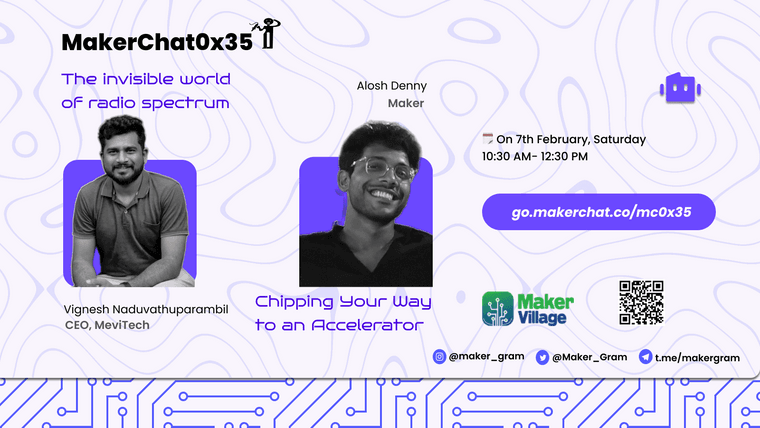
              • Space Tv 0x35 (1).png

                Join the 53rd MakerChat at MakerVillage. India’s largest electronic hardware incubator & ESDM facility, supporting hardware startups with advanced labs, incubation programs, and industry connections (MeitY initiative).

                Explore how AI accelerator chips are built and discover the invisible world of the radio spectrum that powers wireless communication.

                •⁠ ⁠AI Accelerators (Design to Wafer) — Alosh Denny
                •⁠ ⁠Radio Spectrum & Wireless Signals — Vignesh
                •⁠ ⁠Special Session: Startup Support Programs by MakerVillage CEO Mr. Venkat

                🎟️ Limited Seats – Register Now!
                📅 Feb 7 | 📍 MakerVillage
                Register link: go.makerchat.co/mc0x35

                A great opportunity to visit MakerVillage and learn deep-tech from industry experts.

                • read more
              • A

                @salmanfaris No, still now , there is no improvements

                • read more
              • @amalkrishnam3 Hi, Were you able to make any progress.

                • read more
              • A

                I have been working on a similar project . In which I want to capture data using the PDM mic and trasmit it through the BLE available . I am new to hardware and these sensors so I am unable to make sense of the data I am reciving on the other side(central) that is my mobile device(iphone X) with BlueLight application. I am able to find a service and I am reciving some form of hex code,but I don't know how to convert it to wave files or don't know whether it's possible or not .

                If you guys have any idea or any resources that could help please do share.

                I am attaching my code below :

                #include <ArduinoBLE.h> #include <mic.h> // microphone library // Microphone Settings #define DEBUG 1 #define SAMPLES 800 mic_config_t mic_config = { .channel_cnt = 1, .sampling_rate = 16000, .buf_size = 1600, .debug_pin = LED_BUILTIN }; NRF52840_ADC_Class Mic(&mic_config); int16_t recording_buf[SAMPLES]; volatile static bool record_ready = false; // Updated UUIDs #define SERVICE_UUID "19B10000-E8F2-537E-4F6C-D104768A1214" #define CHARACTERISTIC_UUID_AUDIO "19B10001-E8F2-537E-4F6C-D104768A1214" // BLE Service and Characteristic BLEService audioService(SERVICE_UUID); // Corrected initialization with explicit value size and fixed length flag BLECharacteristic audioDataCharacteristic(CHARACTERISTIC_UUID_AUDIO, BLERead | BLENotify | BLEWrite, sizeof(recording_buf), true); void setup() { Serial.begin(115200); while (!Serial) delay(10); Serial.println("Initializing microphone..."); Mic.set_callback(audio_rec_callback); if (!Mic.begin()) { Serial.println("Mic initialization failed"); while (1); } Serial.println("Mic initialized."); Serial.println("Initializing BLE..."); if (!BLE.begin()) { Serial.println("Failed to start BLE!"); while (1); } BLE.setLocalName("SCT Audio"); BLE.setAdvertisedService(audioService); audioService.addCharacteristic(audioDataCharacteristic); BLE.addService(audioService); // Corrected writeValue call with explicit casting audioDataCharacteristic.writeValue((uint8_t)0); BLE.advertise(); Serial.println("BLE Peripheral is now advertising"); } void loop() { BLEDevice central = BLE.central(); if (central) { Serial.println("Connected to central device"); while (central.connected()) { if (record_ready) { // Plot the audio data in the Serial Plotter for (int i = 0; i < SAMPLES; i++) { Serial.println(recording_buf[i]); } // Transmit the audio data audioDataCharacteristic.writeValue((uint8_t*)recording_buf, 2 * SAMPLES); Serial.println("Audio data transmitted over BLE"); record_ready = false; } } Serial.println("Disconnected from central device"); } } static void audio_rec_callback(uint16_t *buf, uint32_t buf_len) { static uint32_t idx = 0; for (uint32_t i = 0; i < buf_len; i++) { recording_buf[idx++] = buf[i]; if (idx >= SAMPLES){ idx = 0; record_ready = true; break; } } }

                My overall project capture the audio using the pdm mic and transmit it through the BLE and we will do a audio processing throguh api(fast api) calls . I don't know whether it's the right way to do this,but that's the overall idea .

                • read more
              • @mkgrmAbhinand Sorry, no simulators are available.

                • read more
              By MakerGram | A XiStart Initiative | Built with ♥ NodeBB
              Copyright © 2023 MakerGram, All rights reserved.
              Privacy Policy | Terms & Conditions | Disclaimer | Code of Conduct